If you already checked my post on GA4 event tracking, then most probably, you’re aware that we can implement phone call tracking using Google Analytics 4 and Google Tag Manager.
I know you might be asking;
“What’s the essence of tracking phone calls on my website?”
Think of it this way.
Whether you are operating a personal or business website you need to get more insights into the available leads.
For your information;
The phone call link clicks might or might not translate to qualified leads.
But, either way;
Collecting data on such events might give you an edge when it comes to lead generation.
Long story short;
Here’s what you should expect from this post;
- What is Phone Call Tracking in GA4?
- Importance of Tracking Phone Call Links
- How to Track Phone Calls
- Limitations of Phone Call Tracking in Google Analytics 4
Let me break everything down for you.
What is Phone Call Tracking in Google Analytics 4

Phone call tracking is an analytics practice for measuring and analyzing phone calls generated by your marketing campaigns or website.
Through this practice, you get to draw insights into the effectiveness of your marketing strategies while at the same time optimizing your campaigns based on data-driven decisions.
If you have not yet implemented a phone call tracking mechanism on your website then you must be missing out on critical insights.
Truth is;
Failing to track phone calls on your website will lead to assumptions about the impact of your digital campaigns on inbound calls.
Consequently, you will be at risk of ineffective marketing campaigns and wasted marketing resources.
Why Should You Track Phone Call Links?
Did you know that 50 percent of marketers use phone numbers on their websites as an essential tool for driving inbound leads?
But that’s not all.
Another study found that phone calls have up to 10-15 times the probability for conversions when compared to inbound web leads.
This data should tell you how phone calls are one of the most critical lead-generation strategies for marketers.
Tracking associated links can help you gain more insights into the effectiveness of your organic and paid campaigns.
In other words;
You can attribute collected phone call data to the correct marketing channel, keyword/s, or traffic source.
For coaches, executives, authors, and speakers, most of their websites are designed to generate leads for high-ticket services and products.
This means that for such websites you need to get on call with the prospect to close a sale.
From this position, when running campaigns, it would be important to attribute phone calls to the exact traffic sources.
Step-by-Step Method for Tracking Phone Calls

Let me show you how to track phone calls using a real-life example.
In this step-by-step illustration, I will track a phone call button on my website using GA4 and GTM.
Without further ado, let’s get started.
Here’s how the current phone button behaves after being clicked.
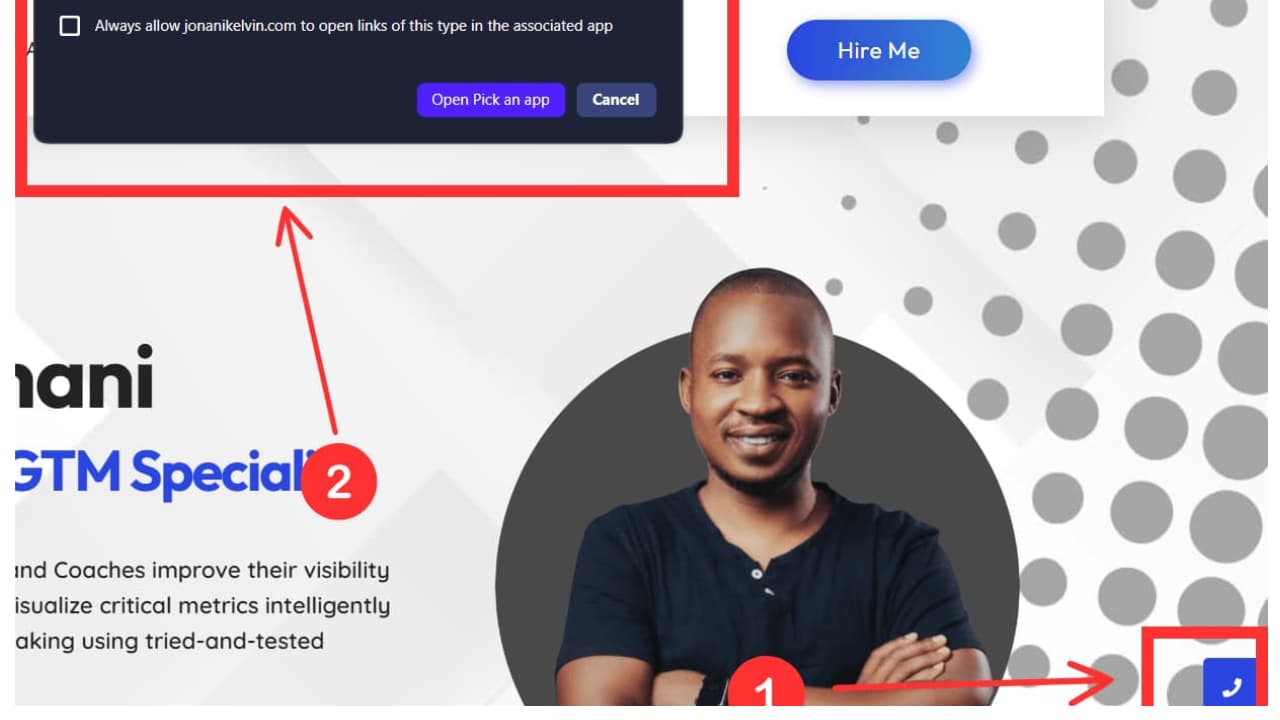
Step One: Right-click on the phone button and select inspect to check whether it is a valid phone number.
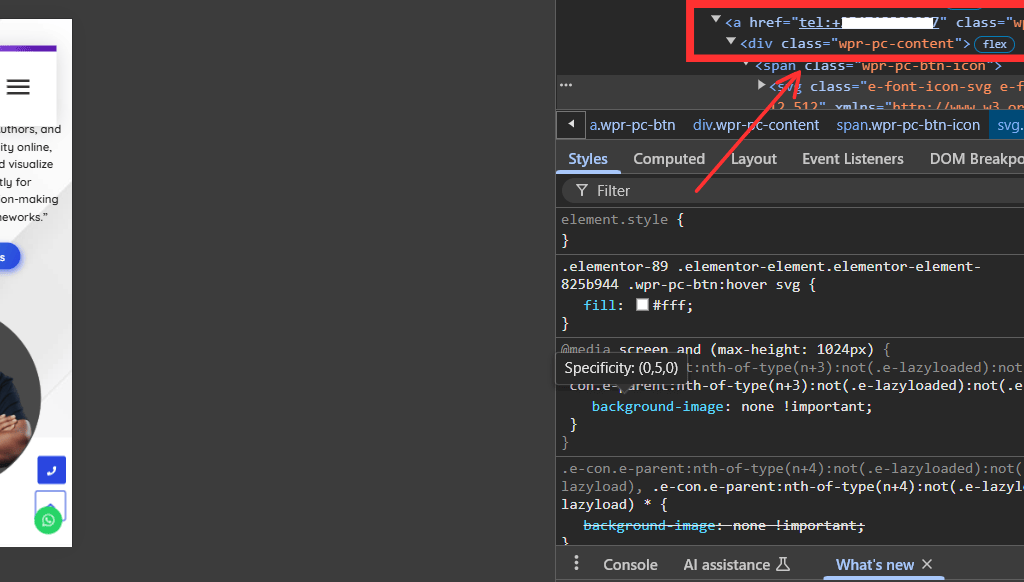
Take note that;
I decided to inspect the button to make sure that the phone number appears as a link. Consequently, I will handle it as a phone link click in GTM.
Step Two: Log into your Google Tag Manager. Go To Triggers and Click New. Then Select ‘Just Links.’ (Note: I am assuming you already have a working/ functional Google Tag Manager and Google Analytics 4)
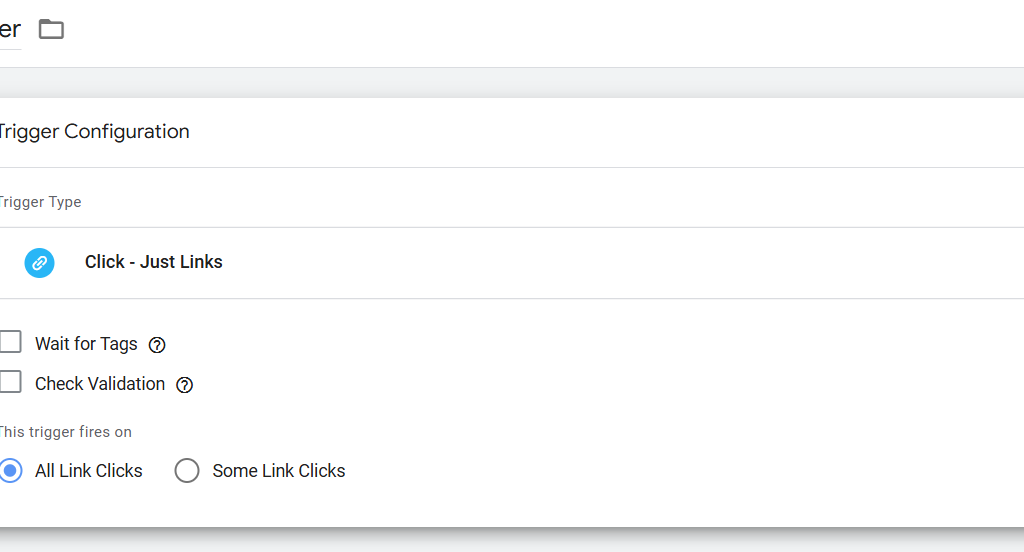
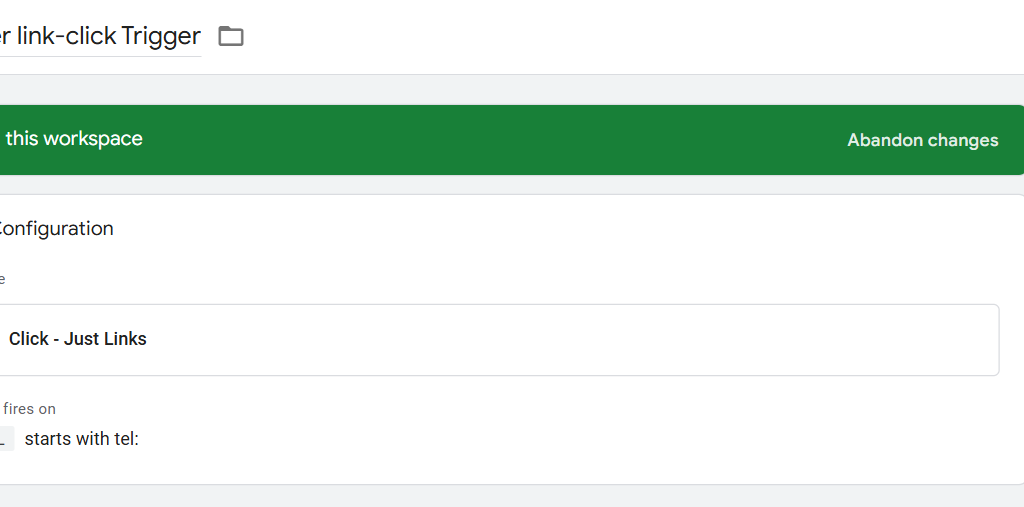
Step Three: Select the ‘Some Link Clicks’ option. Under the ‘Page Hostname’ select ‘Click URL.’
In some instances, you may not see the ‘Click URL’ option immediately all you have to do is select the ‘The Built-in Variable’ option and select ‘Click URL.’
Under the ‘Contains’ option choose starts with and enter ‘tel:’
Name the trigger and save it.
Step Four: Go to Tags and Send an Event when the trigger in Step Three is activated.
Click ‘New’ then ‘Tag Configuration.’ Select ‘GA4 Event’
Enter the tag details including the measurement ID of your GA4 property.
Add Event parameters, for this case I added ‘link_url’ and ‘link_text’ as the main components of the event parameter
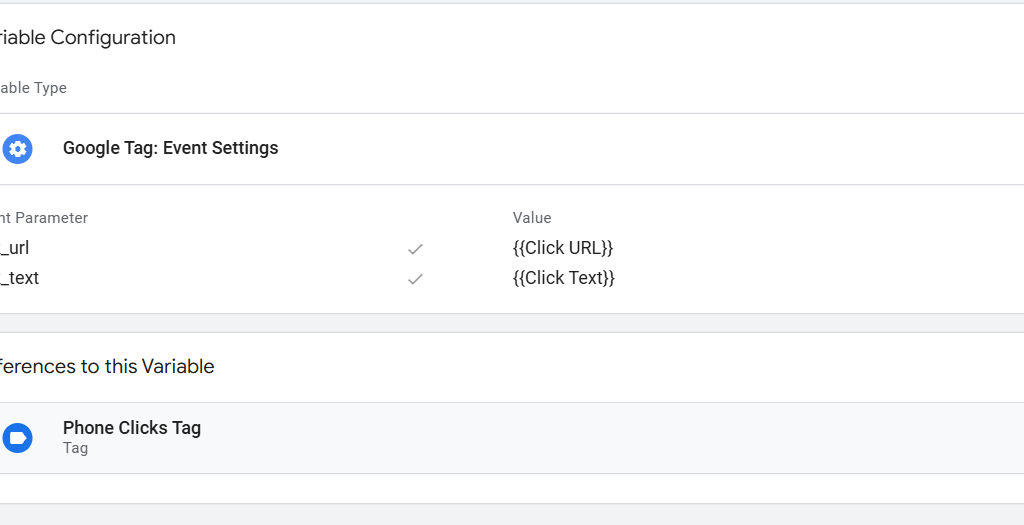
Name and save the associated variable.
Under triggering, select the trigger that we had created in Step Three.
Name the tag and save it as shown below.
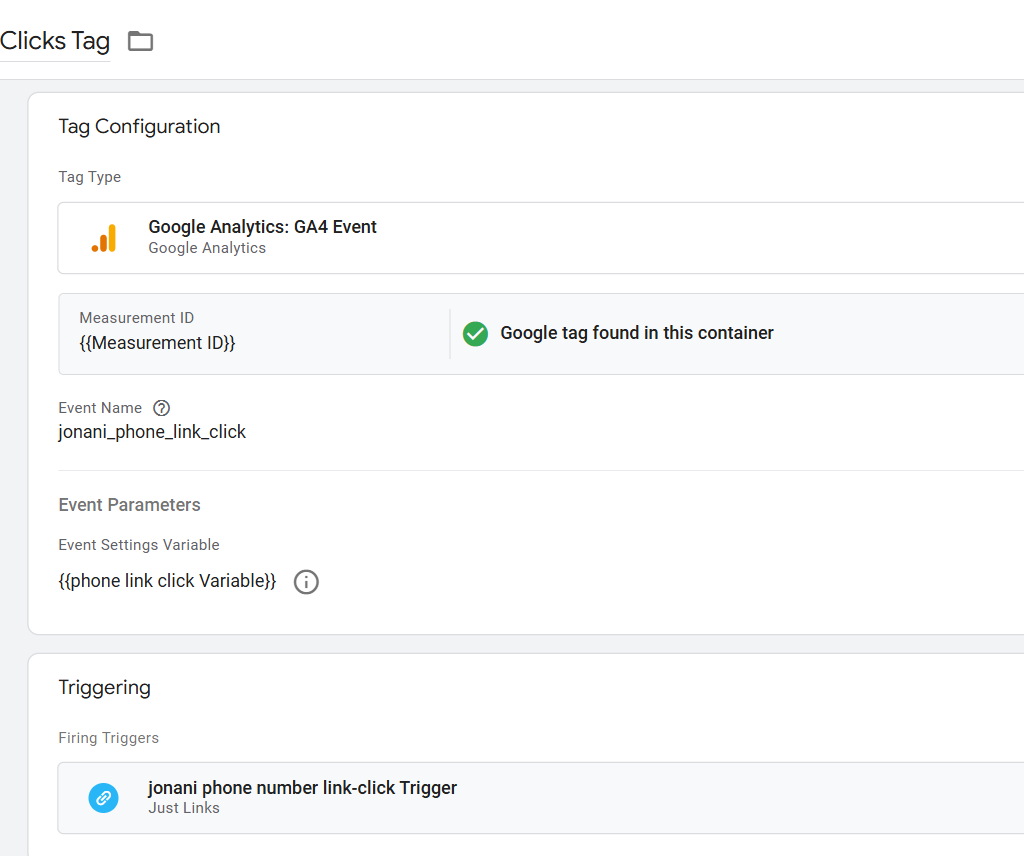
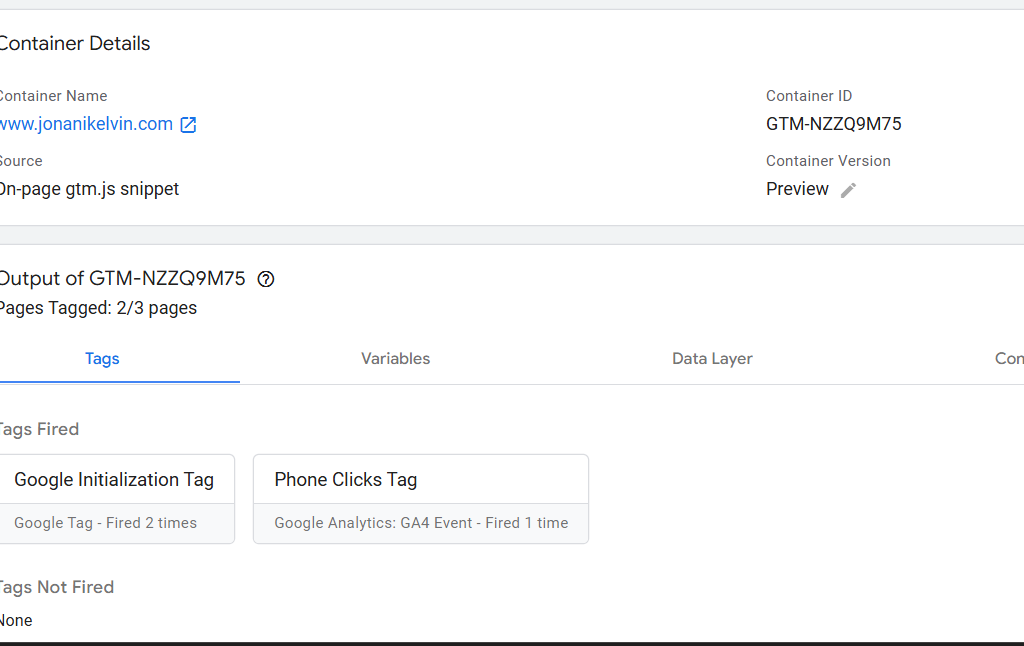
Step Five: Click the ‘Preview’ button and then click the phone call button. Check whether the tag was fired successfully as illustrated below.
Step Six: confirm whether the ‘phone link click’ event is recorded in GA4 using the debug mode.
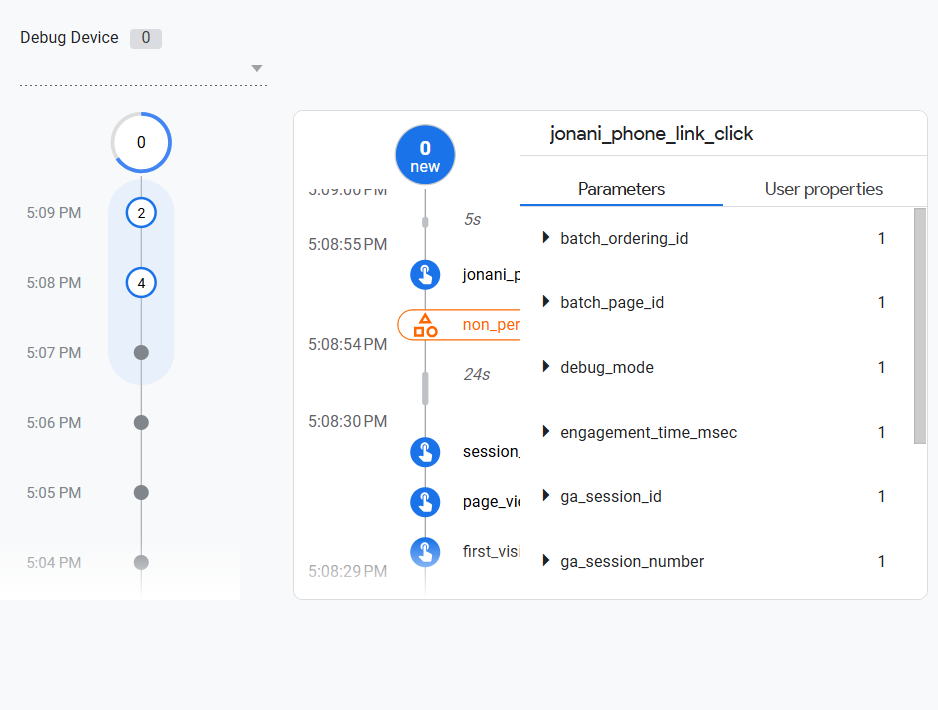
What are the limitations of Tracking Phone Calls Using Google Analytics 4?

Here are some limitations that I have noticed over time.
Possibilities of Accidental Clicks Being Tracked as Key Events/ Conversions
Can I be totally honest with you?
Accidental clicks on phone number links are unavoidable
To drive my point home;
A study by Trademob discovered that at least 22% of mobile ad clicks are accidental.
You should know that GA4 can’t establish whether a click was accidental or intentional.
Put differently;
GA4 only tracks clicks and not the intent associated with the click.
Let’s take for example a case where you have implemented phone call tracking (as illustrated above [insert anchor link to the specific part of the article]).
In addition,
You have listed this event as a Key Event {insert an internal link to key events article in future}.
In such a scenario, your Google Analytics property will continue to count the associated phone call link clicks as ‘key events’ regardless of whether they are accidental or not.
Consequently,
It would be difficult to measure the effectiveness of most of your marketing campaigns.
Limited Insights on the Lead Quality
Let’s assume that a phone call click is intentional.
Take note that there is no guarantee that the lead/s will convert into either a deal or sale.
In fact;
The lead/s might or may not be the exact target audience or willing buyer/s.
In this regard, you might end up counting key events for spam calls, sales calls, and customer support calls.
If you’re not keen on such situations, then you’re likely to collect and analyze unreliable metrics that could translate to a false sense of success.
Limited Data Attribution Settings
Google Analytics 4 has and continues to make significant changes to attribution models with the most recent one being the discontinuity of attribution models such as linear, time decay, position-based, and first click.
Related Resource: The SECRET Behind GA4 Attribution Models (Basic to Advanced Guide + BONUS Info on DDA)
Google Analytics now utilizes last-click and data-driven attribution.
Even though Google claims that the discontinued attribution models are no longer effective, especially when tracking complex buying journeys, removing them could have limited transparency and control marketers had earlier on.
Limited information on the Lead Journey
Google Analytics has limitations when it comes to tracking the full individual customer journey.
Look.
Google Analytics is prohibited from collecting or storing PII (Personally Identifiable Information). This information might include a person’s name, email, and phone number.
Without this data, it’s almost impossible to track marketing channels driving quality leads to your pipeline.
My Final Thoughts
With that said; phone call tracking can be the next game changer for your business or brand. Remember, I can help you track phone call links, and capture, and analyze other critical web data that will help you make data-driven decisions for your business. Contact me today and let me know how I can help.